Paying your monthly rent through the online Tenant Portal is easy!
Your rent is due by the payment dates specified in your lease, which is typically the 1st day of your lease and then on the 1st of each month after a lease starts. Please refer to your lease for the exact dates.
Paying your rent on time helps keep you in good standing as a tenant, and will help you avoid fees for late rent or missed payments.
You can pay in person at the office by check or cash, mail a check, or through the Tenant Portal called Zego with your bank account as an ACH Transfer or Credit/Debit Card Payment. The Credit/Debit Cards accepted are Visa, MasterCard and Discover. Please note that the convenience fee for any online transaction is $2.95 per transaction, and Credit/Debit Cards will also incur a 3% fee. American Express is not accepted, and you will always get an error if you try to enter an AmEx card number.
You can set up an automatic payment through the Tenant Portal. This will save you time and having to remember to make your payments monthly. Missed payments can result in late fees applied to your account.
IMPORTANT: If you do not set up an automatic payment for your account, it is your responsibility to initiate every payment. We are unable to set up an automatic payment for you. You have to do that yourself through the Tenant Portal.
If you would like to activate the automatic payment option for your account, please follow the steps below.
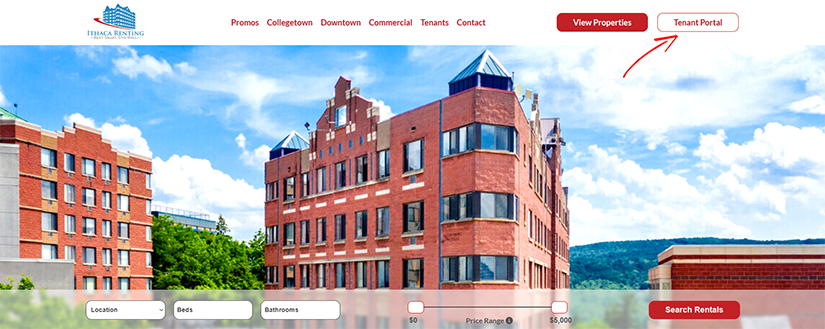
1. Click on Tenant Portal at the upper right hand corner.
2. Login to the Tenant Web Access.
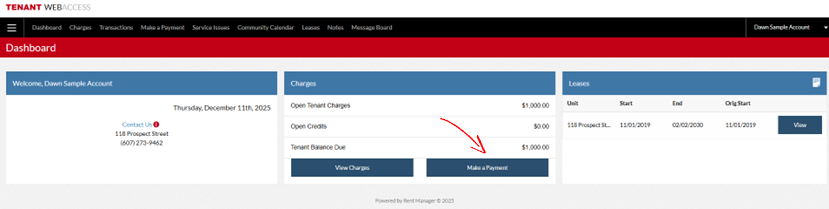
3. Click on Make A Payment, then click on Enabling AutoPay.
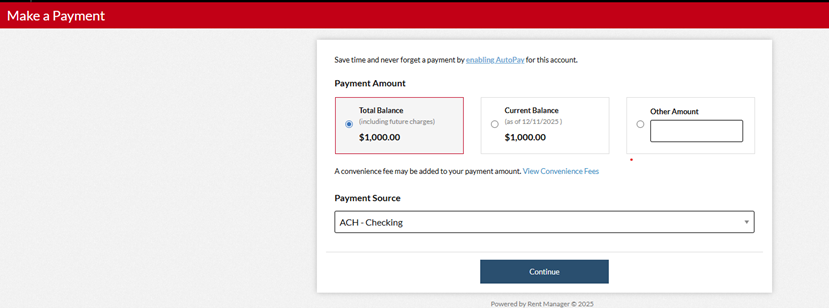
4. Choose the Account Type at the drop down then complete all the account information requested.
Then under the Automatic Payments click on the box next to Enable Your Automatic Payment and complete the information pertaining to the auto payment.
You will need to check the box regarding Non-Fraudulent Transactions then click Save.
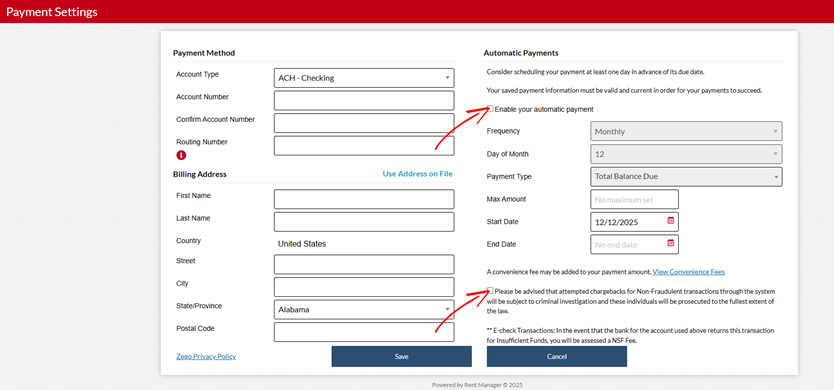
Now you are set up for Automatic Payments from your preferred bank account or Credit/Debit Card. You can enable or disable this option at any time, or change your payment methods.
We can also add a parent to your account so they can have their own direct access to your Tenant Portal. If they would like their own log in with their personal email, just contact your rental office and ask for a parent to be added to your account. Your parents can also log in using your credentials if you prefer.
Additional Notes
If you have charges other than rent that are posted to your portal account, those will also be deducted from your account on your normal payment date. (Example- Lock Out Fees, Lost Key Fees, Unpaid Parking Fees, Unpaid Late Fees, Damages to Apartment)
After you have move out from your apartment and your lease has ended, your tenant portal account will be deleted, and your saved payment information will be deleted. Your auto-payments will end.
Damage Deposits held for apartments are issued as a check 14 days after the lease ends. Unfortunately, the Tenant Portal Company (Zego) does not allow for a refund of your Damage Deposit through their system.
QUESTIONS? Contact Dawn at the Ithaca Renting Company main office at 607-247-9462 ext. 8300.
PROBLEMS/ERRORS? Having trouble making a payment and getting error messages? There is also a direct hotline phone number for the Tenant Portal company (Zego) that is available at any time 1-866-729-5327, Option 1, Option 1.